
Edward Stream Continuation Architecture - Deep Dive
Principal Engineer's Technical Reference
Easy to digest HLD
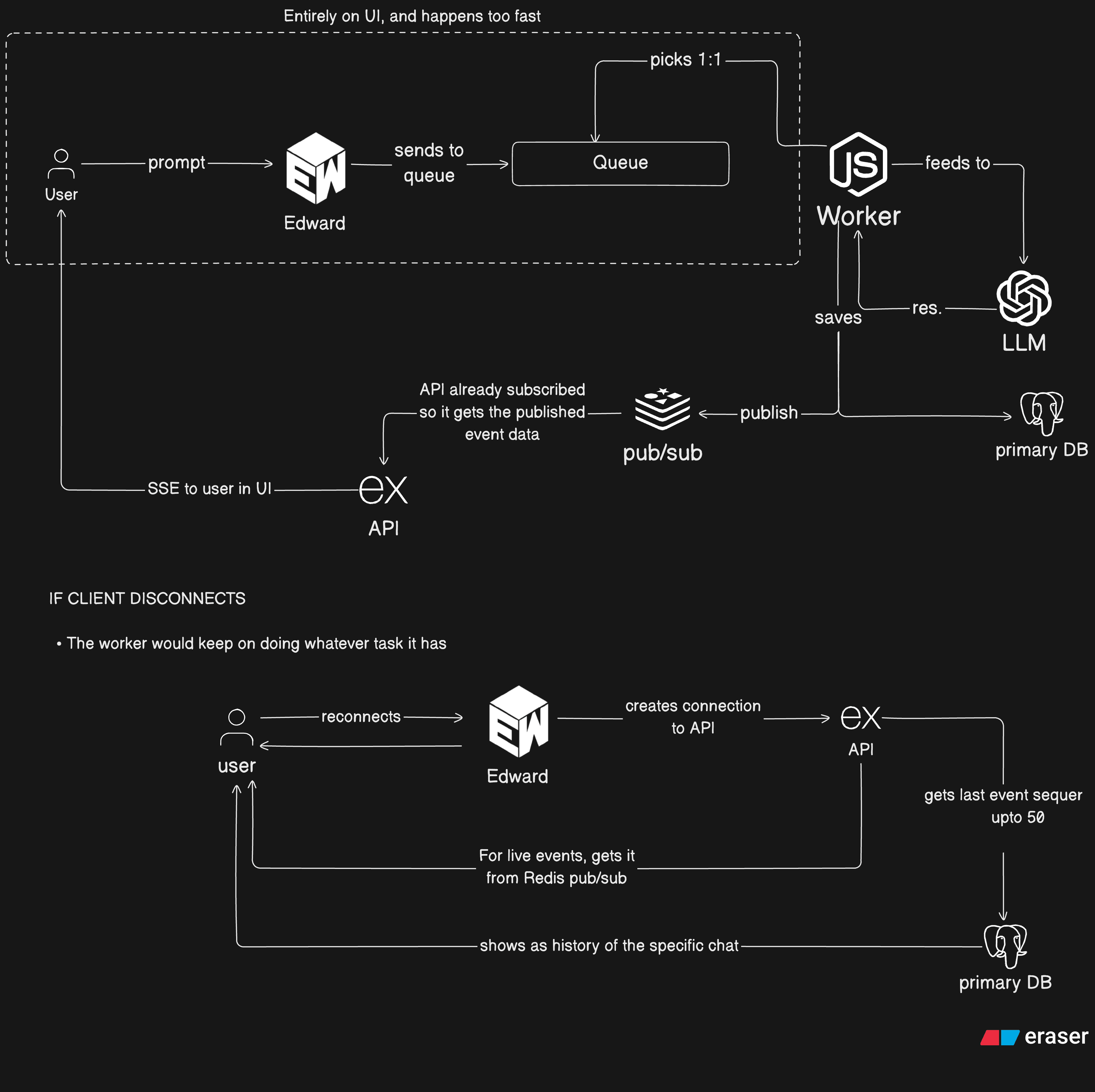
Shared from "Edward" on Inkdown
Stream Continuation is Edward's resilience architecture that enables:
Without stream continuation:
With stream continuation:
All stream events are persisted as an immutable log:
Benefits:
Events delivered via two channels simultaneously:
Why Both?
Frontend tracks last processed event:
Resumption Flow:
?lastEventId=seq:12345seq > 12345Agent loop state checkpointed on continuation turns:
Persisted to: runs.metadata.resumeCheckpoint
File: apps/api/services/runs/runEvents.service.ts
Key Design Decisions:
| Decision | Rationale |
|---|---|
Sequential seq numbers | Enables cursor-based replay, ordering guarantee |
| Dual write (Postgres + Redis) | Durability + real-time delivery |
| Envelope pattern | Decouples storage format from event schema |
| Optional publisher | Allows testing without Redis dependency |
File: apps/api/services/run-event-stream-utils/service.ts
Core Function: streamRunEventsFromPersistence()
Replay Logic:
Buffering During Replay:
Why Buffer?
File: apps/api/services/sse-utils/service.ts
Problem: Slow clients can cause memory buildup
Solution: Queue-based backpressure with graceful degradation
Backpressure Configuration:
Graceful Degradation:
onSlowClientFile: apps/api/services/runs/agent-run-worker/processor.helpers.ts
Problem: Worker needs to capture SSE stream and persist events
Solution: Create mock Response object that intercepts writes
Why This Pattern?
File: apps/api/services/runs/runMetadata.ts
Stored in: runs.metadata.resumeCheckpoint (JSONB column)
File: apps/api/services/chat/session/loop/agentLoop.turnOutcome.ts
Checkpoints created on continuation turns (when agent loop continues):
Continuation Scenarios:
| Scenario | When | Why Checkpoint |
|---|---|---|
| Tool Results Continuation | Tools called but no code output | Need to send tool results back to LLM |
| No-Progress Nudge | No tools called, no output | Need to send nudge prompt |
NOT Checkpointed:
File: apps/api/services/runs/agent-run-worker/processor.session.ts
File: apps/api/services/chat/session/loop/agentLoop.runner.ts
File: apps/api/services/runs/agent-run-worker/processor.finalize.ts
On successful completion:
Why Clear?
File: packages/shared/src/streamEvents.ts
Event Types:
| Category | Events |
|---|---|
| Lifecycle | meta (SESSION_START, TURN_START, TURN_COMPLETE, SESSION_COMPLETE) |
| Content | text, thinking_*, file_* |
| Sandbox | sandbox_*, install_*, command |
| Tools | web_search, url_scrape |
| Errors | error (fatal, recoverable) |
| Metrics | metrics, rate_limit_status, preview_url, build_status |
Database Schema:
Append Function:
File: apps/api/services/run-event-stream-utils/service.ts
Query Pattern:
Why Batch?
Batching Logic:
Multiple Batches:
File: apps/web/stores/chatStream/cursorPersistence.ts
Storage Strategy:
| Layer | Purpose | Lifetime |
|---|---|---|
| In-memory Map | Fast access during session | Tab lifetime |
| sessionStorage | Persistence across refresh | Tab lifetime (survives refresh) |
Why Not localStorage?
File: apps/web/stores/chatStream/resumeRunStream.ts
File: apps/web/lib/api/chat.ts
Request Format:
File: apps/web/hooks/chat/useChatPageOrchestration.ts
Active Run Lookup:
Lookup Strategy:
| Mode | Attempts | Use Case |
|---|---|---|
| Aggressive | 6 | Page load, user expects active run |
| Single | 1 | Background check |
| Defer | 0 | Streaming already in progress |
File: apps/web/lib/streaming/processors/chatStreamProcessor.ts
Built-in Replay:
Why Client-Side Replay?
File: apps/api/services/runs/agent-run-worker/processor.ts
Startup:
File: apps/api/services/runs/agent-run-worker/processor.finalize.ts
On Success:
On Failure:
Why Keep Checkpoint on Failure?
| Failure Mode | Detection | Recovery | Data Loss |
|---|---|---|---|
| Client disconnect | req.close event | Reconnect with cursor | None |
| Slow client | Backpressure queue | Graceful close | None (events persisted) |
| Worker crash | Job timeout | Queue retry + checkpoint | Minimal (since last checkpoint) |
| Redis unavailable | Connection error | Fallback to PostgreSQL polling | None |
| PostgreSQL unavailable | Query error | Retry with backoff | Temporary (events buffered) |
| Stream timeout | Guard timer | Terminate with reason | None (events persisted) |
| Network blip | SSE connection drop | Auto-reconnect | None |
File: apps/api/services/run-event-stream-utils/service.ts
What Happens:
req.close eventFile: apps/api/services/run-event-stream-utils/service.ts
Detection:
res.write() returns false (backpressure)Recovery:
File: apps/api/services/runs/agent-run-worker/processor.ts
Crash Detection:
Recovery:
What's Lost:
File: apps/api/services/chat/session/orchestrator/streamGuards.ts
On Timeout:
STREAM_TIMEOUTFile: apps/api/lib/redisPubSub.ts
Fallback Strategy:
Q: What's the event volume per run?
Typical run:
Q: What's the storage requirement?
Per run estimate:
At 10,000 runs/day:
Q: Should we partition the run_events table?
Recommendation: Yes, partition by created_at (monthly partitions)
Benefits:
Q: What indexes are needed?
Q: What's the Redis memory footprint?
Pub/sub channels:
edward:run-events:{runId}At 1,000 concurrent runs:
Q: What about event buffering?
Events are NOT buffered in Redis (only published):
Q: Redis cluster vs standalone?
Recommendation: Standalone for pub/sub
Why:
Failover:
Q: What's the pub/sub latency?
Typical latency:
Impact:
Q: How many concurrent SSE connections?
Estimate:
Q: Can a single server handle this?
Node.js SSE capacity:
Q: What about horizontal scaling?
Challenge: SSE connections are sticky (can't load balance mid-stream)
Solutions:
Sticky sessions (recommended)
Connection migration
WebSocket + migration
Q: What's the heartbeat strategy?
Why Heartbeats?
Q: How to handle connection limits?
Browser limits:
Mitigation:
Q: How many workers?
Formula:
Typical:
Q: Worker autoscaling?
Metrics to track:
Scaling policy:
Q: What about worker affinity?
No affinity needed:
Q: How long to keep events?
Recommendation: 30 days
Why:
Cleanup strategy:
Q: What about checkpoint retention?
Recommendation: Clear on completion, keep on failure
Why:
Q: What metrics to track?
Stream Health:
stream_reconnect_count: Reconnections per runstream_replay_events: Events replayed per reconnectstream_duration_ms: Total stream durationstream_termination_reason: Distribution of termination reasonsCheckpoint Health:
checkpoint_created_count: Checkpoints createdcheckpoint_resume_count: Runs resumed from checkpointcheckpoint_turn_distribution: Turns per checkpointEvent Volume:
events_persisted_count: Events per runevents_replay_lag_ms: Time to replay eventsredis_pubsub_latency_ms: Pub/sub latencyQ: What alerts to set?
| Metric | Threshold | Action |
|---|---|---|
stream_reconnect_count > 5 | Per run | Investigate network issues |
checkpoint_resume_count > 10% | Of runs | Investigate worker stability |
events_replay_lag_ms > 5000 | P99 | Optimize replay queries |
redis_pubsub_latency_ms > 100 | P99 | Check Redis health |
| File | Purpose | Lines |
|---|---|---|
apps/api/services/runs/runEvents.service.ts | Event persistence | ~40 |
apps/api/services/run-event-stream-utils/service.ts | SSE streaming + replay | ~250 |
apps/api/services/sse-utils/service.ts | SSE backpressure handling | ~200 |
apps/api/services/runs/agent-run-worker/processor.ts | Worker execution | ~350 |
apps/api/services/runs/agent-run-worker/processor.helpers.ts | Event capture | ~150 |
apps/api/services/runs/agent-run-worker/processor.finalize.ts | Run finalization | ~150 |
| File | Purpose | Lines |
|---|---|---|
apps/api/services/runs/runMetadata.ts | Checkpoint schema | ~100 |
apps/api/services/runs/agent-run-worker/processor.session.ts | Checkpoint persistence | ~100 |
apps/api/services/chat/session/loop/agentLoop.runner.ts | Agent loop with checkpoint | ~200 |
apps/api/services/chat/session/loop/agentLoop.turnOutcome.ts | Continuation logic | ~250 |
apps/api/services/chat/session/shared/checkpoint.types.ts | Checkpoint types | ~15 |
apps/api/services/chat/session/shared/continuation.ts | Continuation prompts | ~250 |
| File | Purpose | Lines |
|---|---|---|
apps/web/stores/chatStream/cursorPersistence.ts | Cursor storage | ~50 |
apps/web/stores/chatStream/resumeRunStream.ts | Stream resumption | ~150 |
apps/web/lib/api/chat.ts | SSE API client | ~100 |
apps/web/lib/streaming/processors/chatStreamProcessor.ts | Stream processing | ~400 |
apps/web/hooks/chat/useChatPageOrchestration.ts | Page orchestration | ~250 |
| File | Purpose | Lines |
|---|---|---|
packages/shared/src/streamEvents.ts | Event type definitions | ~250 |
| File | Purpose | Lines |
|---|---|---|
apps/api/lib/redisPubSub.ts | Redis pub/sub | ~80 |
apps/api/lib/redis.ts | Redis client creation | ~20 |
| File | Purpose |
|---|---|
apps/api/tests/services/runs/agentRun.processor.session.test.ts | Checkpoint tests |
apps/api/tests/services/runs/runMetadata.test.ts | Metadata parsing tests |
apps/api/tests/controllers/chat/streamSession.shared.test.ts | Continuation prompt tests |
apps/api/tests/services/chat/runEventStream.utils.service.test.ts | Stream replay tests |
| Term | Definition |
|---|---|
| Checkpoint | Snapshot of agent loop state for resumption |
| Cursor | Last processed event ID (client-side) |
| Event Sourcing | Pattern of persisting all state changes as events |
| Replay | Re-emitting historical events on reconnection |
| SSE | Server-Sent Events (one-way streaming from server to client) |
| Turn | Single iteration of agent loop (LLM call + tool execution) |
| Worker | Background process that executes agent runs |
| Variable | Default | Description |
|---|---|---|
STREAM_GUARD_TIMEOUT_MS | 1200000 | Stream timeout (20 min) |
MAX_AGENT_CONTINUATION_PROMPT_CHARS | 20000 | Continuation prompt limit |
MAX_AGENT_TURNS | 10 | Max agent loop iterations |
MAX_AGENT_TOOL_CALLS_PER_TURN | 10 | Tool budget per turn |
MAX_AGENT_TOOL_CALLS_PER_RUN | 50 | Tool budget per run |
MAX_REPLAY_BATCH | 500 | Events per replay batch |
HEARTBEAT_INTERVAL_MS | 15000 | SSE heartbeat interval |
| Channel | Purpose |
|---|---|
edward:run-events:{runId} | Live event pub/sub |
edward:run-cancel:{runId} | Cancel signal |
agent-runs | Worker job queue |
| Key | Purpose |
|---|---|
sse_cursor:{chatId}:{runId} | Frontend cursor |
Document Version: 1.0
Last Updated: March 25, 2026
Author: Principal Engineering Review