InkdownInkdown
Start writing

core

4 files·0 subfolders

Shared Workspace

core
DNS

DNS

Shared from "core" on Inkdown

DNS, Nameservers, and Cloudflare: Concise Context

Core Idea

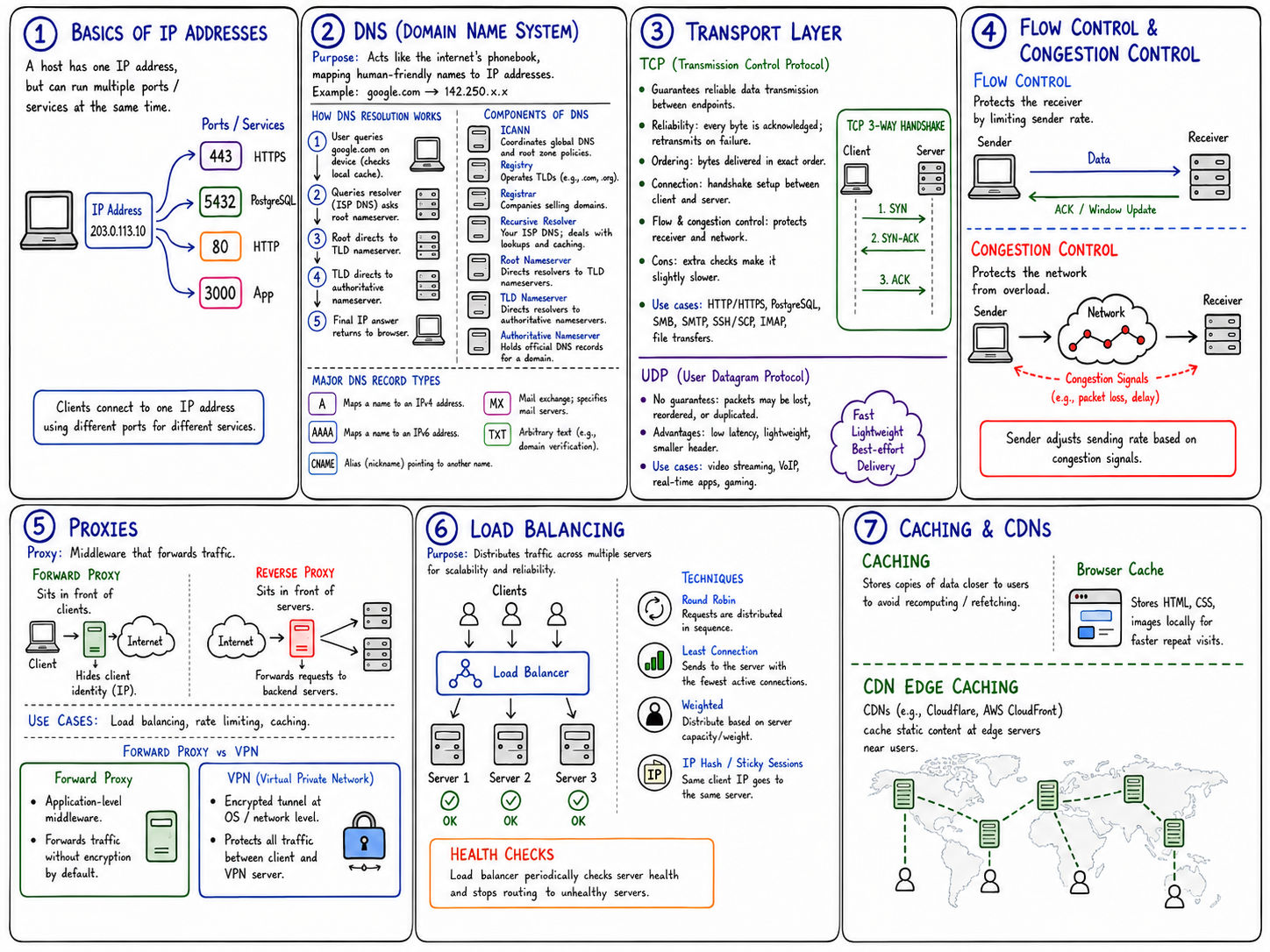
DNS is the internet's naming system. It converts human-readable domains like example.com into machine-usable answers, most commonly IP addresses, so browsers know which server to connect to.

DNS is not one central database. It is a distributed, hierarchical, cached lookup system.


Main Actors

ActorWhat it does
ICANNCoordinates global DNS governance and root-zone policy. It is not queried directly every time you visit a website.
Event loop
programming-language-concepts.md
zero-language-explanation.md
RegistryOperates a top-level domain, such as .com, .in, or .org. It stores delegation info for domains under that TLD.
RegistrarThe company where you buy/manage the domain registration, such as GoDaddy, Namecheap, or Cloudflare Registrar.
Recursive ResolverThe DNS server your device asks first. It performs the lookup on your behalf. Examples: ISP DNS, Google 8.8.8.8, Cloudflare 1.1.1.1.
Root NameserverTells the resolver which TLD nameservers handle a TLD like .com.
TLD NameserverTells the resolver which authoritative nameservers handle a specific domain like example.com.
Authoritative NameserverHolds the official DNS records for a domain. This is the final source of truth.
Website ServerThe actual server that hosts and serves the website after DNS resolution is complete.

Important Correction

When a user types google.com, the request does not go to ICANN first.

The real flow is:

  1. Browser checks its own DNS cache.
  2. Operating system checks local cache and host mappings.
  3. Recursive resolver receives the query.
  4. Resolver asks root nameservers where to find .com.
  5. Resolver asks .com TLD nameservers where to find google.com.
  6. Resolver asks Google's authoritative nameservers for the record.
  7. Resolver returns the answer to the user's device.
  8. Browser connects to the returned IP address.

DNS Lookup Flow

Rendering diagram…

What a Nameserver Is

A nameserver is a DNS server that answers DNS questions.

When people say "your domain's nameservers," they usually mean the authoritative nameservers assigned to your domain.

These nameservers hold and serve records such as:

  • A: domain to IPv4 address
  • AAAA: domain to IPv6 address
  • CNAME: alias to another hostname
  • MX: mail servers
  • TXT: verification, SPF, DKIM, etc.
  • NS: which nameservers are authoritative
  • SOA: zone metadata

The nameserver does not host your website. It only answers DNS questions.


Registrar vs Nameserver

ConceptMeaning
RegistrarWhere the domain is registered and owned.
NameserverWhere the domain's DNS records are officially answered from.
Hosting ServerWhere the actual website files/app run.

A domain can be registered at GoDaddy while using Cloudflare nameservers. These are separate roles.


GoDaddy to Cloudflare Example

When you buy a domain from GoDaddy, GoDaddy may initially provide default nameservers like:

Text
ns1.godaddy.com
ns2.godaddy.com

That means GoDaddy's DNS servers are authoritative for your domain.

When Cloudflare asks you to replace those with nameservers like:

Text
ananya.ns.cloudflare.com
brad.ns.cloudflare.com

Cloudflare is asking to become the authoritative DNS provider for your domain.

You are telling the TLD registry:

For this domain, ask Cloudflare's nameservers for the official DNS answers.

This does not necessarily transfer the domain registration from GoDaddy to Cloudflare. It only changes who controls and serves the DNS zone.


Nameserver Change Flow

Rendering diagram…

Why Cloudflare Needs Nameserver Control

Cloudflare needs to be authoritative for your DNS if it is going to manage DNS records and optionally proxy traffic.

Once Cloudflare is authoritative, it can:

  • Serve your DNS records
  • Proxy web traffic through Cloudflare IPs
  • Hide your origin server IP
  • Provide CDN caching
  • Provide SSL/TLS handling
  • Apply DDoS protection
  • Apply firewall/security rules
  • Provide traffic and DNS analytics

If GoDaddy nameservers remain active, Cloudflare is not the authoritative DNS source.


What the Registry Stores

The TLD registry usually does not store your website IP directly.

For example.com, the .com registry mainly stores delegation info:

Text
example.com -> ask these authoritative nameservers

Then the authoritative nameservers store the actual DNS records:

Text
example.com -> A -> 203.0.113.10
www.example.com -> CNAME -> example.com
example.com -> MX -> mail provider

Complete Mental Model

Rendering diagram…

Simple analogy:

Internet ConceptAnalogy
RegistrarPlace where you legally register the shop name
RegistryGovernment database for that category of shop names
NameserverFront desk that gives directions
DNS recordsDirection book behind the front desk
Website serverActual shop/room where the content exists

Final Summary

A nameserver attached to your domain is the DNS authority for that domain.

Changing nameservers changes who the internet asks for your domain's official DNS records.

It does not automatically move your domain registration or website hosting. It only changes the authoritative DNS provider.

So the cleanest model is:

Text
Registrar = where you own the domain
Registry = TLD-level delegation database
Nameserver = official DNS answer source
DNS records = instructions for domain/subdomain/email/etc.
Website server = actual machine serving the site